The following notes assume three file sets: A: the remote site; B: The local site; C: The repository.
We are linked to the repository using the SVN+SSH method I discussed yesterday.
Caution 1
In this particular site, I have a folder within which server-side code generates and deletes server-side text files and modifications to MS Access databases. It is therefore necessary to sync from the server to the local copy. This is done using the settings: Get newer files from remote, and delete local files not on remote server. As in the following dialogue.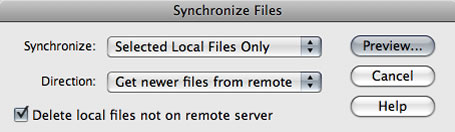
However in my particular site my preview list of files appeared as follows. Can you spot what’s wrong?!
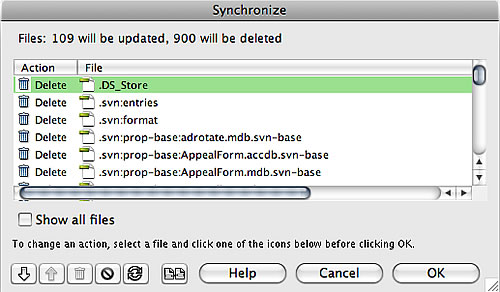
By linking your local site to a subversion repository, you make that local site folder a working copy. This creates a host of hidden files within your local site folder which are used to coordinate synchronisation with the repository. These files should only ever be touched by Subversion. Dreamweaver however has decided in its synchronisation process to check to see if each of these files are on the remote server. Of course they are not – nor ever should be. Dreamweaver has then listed them for deletion!
Important: DO NOT ALLOW ANY OF THESE FILES TO BE DELETED as part of this sync-down. Doing so will break your working copy and break your local site’s sync with the repository.
Of course in the preview list you can go through and set the files you wish not to be afftected to be skipped as I have in the following snapshot…
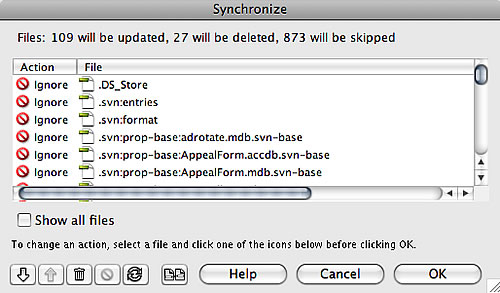
Clearly from the above Dreamweaver has not only given me a huge list to work through, but in doing so has wasted a whole load of time – the FTP commands for checking 900 files are quite time consuming.
I’m not sure why Dreamweaver is including .svn files in this particular synchronisation effort. I can think of no use-case where this would be desired. Dreamweaver is smart enough not to attempt to sync .svn files when updating to the remote server rather than from the remote server.Therefore I suspect this is an over-sight, and I have logged it as a bug via the Adobe Bug Report Form.
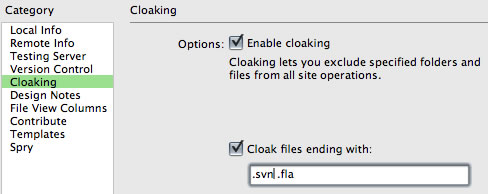
There is a quicker safer way to avoid .svn files being sync’d in this way, and that is to use cloaking. For each site at issue, right-click the site’s root folder and choose Cloaking > Settings…, then enable cloaking and add .svn to the file list…
Caution 2
Deleted site files, either deleted via a sync operation or direct deletion in the Files window, do not get committed to the repository on your next ‘check-in’. In fact so far I have not seen any way for Dreamweaver to inform the repository of deletions and I am currently relying on 3rd party tools to undertake the commit. In my case I use SCPlugin and commit the site folder, at which point it will list the deleted files as ‘missing’. Selecting those and hitting commit records them as deleted to the repository.
Maybe I’m missing something as this seems a major omission of basic functionality. It is quite dangerous for deletions not to get properly recorded to the repository, running the risk that the deleted files may be inadvertently restored to the local copy and eventually to the live site.
Update (4 November 2008):
Having found the documentation, it is clear that Dreamweaver’s subversion integration really does not extend to committing deletions to the repository. They need to be done either manually or through a 3rd party tool as I describe above. Pretty unfriendly for anyone new to subversion and quite different from the workflows used within dreamweavers for sunchronistion between local and remote sites for instance. Personally I think the documentation should explain this fact much far prominently as well as describing in more detail how manage deletion and renaming if connected to subversion.

If you’re on windows, you can use Subweaver http://code.google.com/p/subweaver/ to integrate SVN functions into dreamweaver via tortoisesvn right now.
[…] My earlier notes related: Dreamweaver CS4, Subversion and site Synchronize. Two cautions. […]
I guess I am one of the newbies… I am using DW CS4 and Subversion independently. So, I have a remote server, a local copy and the SVN server to synchronize.
I just ran into the Synchronization problems with the .svn files. I updated the cloaking and I’m trying to synchronize again. How will SubWeaver help to sych the SVN server? I’d appreciate any help you might have….
Thanks!
@Cathy, I’m using a Mac and so don’t use Tortoise nor SubWeaver, so I don’t think I can help on your specific question. Only than to suggest, that through Tortoise, you will be able to sync deletions to your SVN repository – that you would have to do manually if you were using DreamWeaver alone. Once you’ve done such changes outside DreamWeaver, you probably need to right-click your site folder in the files view, and choose “Version control> Cleanup” so that DWs view of your working copy is current.
To delete files on your local and have the changes commited to your repository you need to switch to “Repository View” in DWCS4 and use your keyboard’s delete (DEL) key to delete the file(s). You will also need to delete the file(s) from your “Local View” too. In other words, delete the file(s) from local and repository views using DW and the changes will be committed to your subversion server.
Good points worth noting. Thank you.
However you describe what remains a manual process that doesn’t sit well with the synchronisation workflows the user understands between local/server/testserver. It should be possible to synchronise the state of the local copy to the repository within Dw without having to resort to external tools and without having to manually delete file by file as you describe.
I have my fingers crossed that the SVN integration will have been significantly developed for CS5 due out in the next couple of months or so.