creacog

Product Owner/Manager; Digital Project Manager, ex-Developer Available for Product Owner roles

hunting a vps

I’ve been a New Media developer (RIA developer in modern speak) for a fair few years. Despite a period of Web-Application development, I’ve so far managed to avoid any serious sysadmin. However I now have a number of different applications I’d like to run on-line (the likes of WordPress, Bugzilla, Drupal and others), and keep them live 24/7. None of them are high-traffic, and while I have machines at home that I could run them from, for the sake of the planet, my electricity bill, as well as the temperature, and noise in my flat, I didn’t want them running here 24/7. So the quest was on to find a VPS, and do so without breaking the bank.

Obviously Googling on VPS Hosting will return loads of potential providers. Following are my notes against those I gave further examination and my final choice.

Hostway

I’ve been with Hostway for what seems like for-ever, both through my last ‘permanent’ employment, and my more recent years with my own company. My main site is hosted there via a windows shared hosting account. It is relatively in-expensive, and has served me well over the years. However it doesn’t allow me the flexibility I feel I now need. Their VPS solutions start at £39.95 / month, which is way too expensive for me. (The value of VPS with respect to my requirements is far less than that.)

MediaTemple

I was quite interested in MediaTemple. A number of prominent respected bloggers are hosted by them, and they seem very much oriented to serving freelance designers and techies of my ilk. Their “Grid-Service” is a step up from a shared service – but not quite VPS. This service allows multiple domains and one-click install of loads of applications, and includes SVN pre-installed. They are US based, and at $20/month the current £:$ ratio makes the pricing pretty good – especially compared with my Hostway web-share. The fear-factor for me was the mysterious GPU measurement. I have read some bad press out there (although I think they’ve fixed most of the mysql issues that were the root of most complaints).

I suspected that my chances of getting Bugzilla to run in that environment, may be problematic. (It is not the most straight forward install in the world.) Admittedly I didn’t get around to asking them the question.

An alternative for which I’m sure I would have had no trouble installing Bugzilla is their “dedicated-virtual” at $50/month (20Gb disk 256Mb Ram, 1Tb bandwidth) seemed worth a look and good value compared with Hostway’s VPS. However I really wanted the server based in the UK if at all possible.

WebFusion

I had a look at WebFusion. Starting at £19.95/month for “VPS value” seemed worth investigating. I’m generally happy with 123-reg (part of the same group). However I’ve had a bad experience with WebFusion in the distant past. Since they were bought out by Pipex I thought they’d be worth a fresh look. A cursory glance shows that pre-installed software is quite old – PHP4, MySQL 3.23.58. A quick google-around revealed a couple of complaints of poor support, and an unresponsive VPS over a prolonged period of time. These complaints made me somewhat less interested.

ByteMark

Following a thread in the WAUK mailing list, a colleague made a valued recommendation for ByteMark.

You essentially start with a 150MB (RAM) machine, 10GB disk, 50GB traffic at £15/month but can grow it if you need to. The machines are in the UK (helps with things like data protection).

This is for a plain VPS. I’m not a sysadmin (nor do I wish to be one), and while I can cope with Apache config, I’d be a complete newbie as regards DNS and email etc, so thought I’d really need/benefit from a control panel. The only black mark against using ByteMark for this is that I’d need help finding and installing such a control panel.

CheapVPS

I chanced upon CheapVPS. Normally a name like that would deter me immediately. But I thought it worth a punt, with the pricing for an entry level Linux plan:

128Mb ram
5Gb disc
150Gb band
£4.75 / month

The server is in the UK. It is implemented with HyperVM which allows you to install the LXAdmin control panel which itself includes an application installer for a load of stuff including WordPress 2.1, Drupal 5.1 etc.

After playing around with it for a few days, I got a couple of plain sites, a test WordPress site and Bugzilla running. I am pretty happy with progress so far. I’ll follow up later with a post on installing Bugzilla into this system, as it did take me 3 attempts to get it right.

Posted by creacog in Hosting, HyperVM, LXAdmin, vps, 5 comments

new domain : blog.creacog.co.uk

If you came here via http://creacog.wordpress.com/ you should have been redirected to http://blog.creacog.co.uk/ which is the new and permanent domain for this blog. This is the first step in what will be a migration away from worpress.com’s free hosting to a separate server where I’ll have greater control. Feed users may like to update their book-marks to the new feed address.

Posted by creacog, 0 comments

initial gripes with new Flash CS3 ui

I know – I’m turning into Victor Meldrew. I can’t seem to help it. Should Adobe sort out the current licensing and pricing nightmare I’m going through, I’m sure I will become more chilled.

While others have been hung up on the new icons, personally I have no issue with them. They remind me of Rowntrees Tooty Frooties – which is not a bad thing! My issues (admittedly minor) are with some of the work on the new user interface.

I can appreciate the general investment in improving the UI. However I find some of the additions odd, and on my system some seem poorly implemented?

1. Introduction of Windows style controls on the Mac.

Most of the palettes introduce a collapse control (-) and close control (x) in the top right-hand corner. Mac convention is for the close control to be top left control and in both cases I think aqua controls and positioning would have been better – more consistent with other (non Adobe) applications.

I also find it strange that most palettes introduce this new arrangement, but other ‘windows’ retain the standard Mac behaviour (e.g. document windows and the control window). Mixing it up in this way just feels odd.

DebugController

2. Palette drag

When dragging a palette, it will go semi-transparent. Potentially useful – being able to see what will be covered up before dropping the palette into position. This is also part of the softening of the UI and should enrich the user experience. But on my system, when the mouse is released, the palette disappears briefly before being re-drawn opaque. This ‘flicker’ when a palette is released is plain ugly and detracts hugely from the user-experience. Until it is fixed I would have rather not bother with semi-transparent efforts.

I guess this might be an issue with my system being quite old? (Mac G4 Dual 1GHz Mirror).

3. Welcome panel links to the Adobe site are not working as intended

I think this is just an issue of the Adobe site not having been updated to service the links. You’ll find that from the Flash Welcome window, clicking on either “Getting started ››” or “New features ››” simply dumps the user at the flash product page. The problem seems to be server-side. The pages which flash attempts to take you to, simply re-direct back to the product page.

We fare slightly better with “Resources ››”. However most of the content on that page is written for FlashMX 2004 or Flash 8. I think by now there should be some CS3 articles on there.

Hopefully that’s the end of today’s grumpiness. Although I just read the SaveAs Gotcha written up by Aral. 🙁

Posted by creacog in Adobe, CS3, Flash Platform, Mac OS, 2 comments

worth a view…

Video of Christian Cantrell demonstrating an Amazon S3 (which I didn’t know existed) library and client application in Apollo using the soon to exist Apollo Beta.

Not sure what he’s been drinking (cup of pink stuff) but even with the empties, his desk is far tidier than mine.

Posted by creacog in Apollo, Flex, 0 comments

CS3 trial versions now available for download

hurrah!

Not sure why they couldn’t have been ready when the product shipped? But they are there now.

Now I just need to persuade Adobe UK Licensing that my MVLP Studio 8, 24 month subscription sold to me when my DEVNET account expired does in-fact cover this upgrade to CS3 Web Standard. I’ve been playing email ping-pong with them over this for the past couple of weeks. Hopefully this will be resolved before my trial versions expire!

Posted by creacog in Adobe, CS3, DreamWeaver, Flash Platform, 0 comments

Apple Security Update 2007-004 stuffed my Mac

Ok, this may be guilt by association, but since allowing this update to install last Friday, I have experienced serious problems. Many other folks around the web have reported problems with this update, but I haven’t yet found any postings covering the issues I encountered.

In recent years, I have been of the opinion that it is best to keep up-to-date with the latest patches, as the security risk of not being patched out-weighs the risk of the patch itself causing problems. This is the first time I have had cause to doubt this approach.

This entry attempts to describe some of the problems and the efforts I made to fix them. However I should probably have done this from the outset and saved myself a lot of time. I still have some residual problems, but the worst of it seems over. Note: None of this constitutes advice. Repeat any of my actions at your own risk.

The machine concerned is a Mac Dual 1GHz G4 Mirror.

My user data, and work data are all regularly backed-up using Retrospect, and I keep all my work data on a non-system disk. So I was able to tinker around confident in the fact all my important data is protected. However I don’t currently back-up the system or applications. The theory being that they can be restored by a fresh install of both the system and applications. That said, it would take a long time!

The symptoms…

  1. Firefox would crash almost immediately on launch
  2. FontBook crashed immediately on launch
  3. Most other applications would ‘unexpectedly quit’ after a few minutes operation. Such applications include:
    1. Safari
    2. Mail
    3. DreamWeaver
    4. Terminal
    5. TextWrangler
    6. The Dock !!!

Re-installing Firefox had no effect. It still crashed at the point after rendering the Mozilla title bar in the default site.

However, of these (3) is the most serious. Apart from anything else, crashing applications degrade document data over time. My first instinct was to think this may be due to a hardware problem, specifically failing memory?

I ran Apple Hardware Test a number of times, after-which I was relatively confident that the memory was ok. No problems were reported.

Using the Console utility to view the crash reports, it was clear that the applications where crashing each with the same instruction…

Exception: EXC_BAD_INSTRUCTION (0x0002)
Code[0]: 0x00000002
Code[1]: 0x902d6690
Thread 0 Crashed:
0 ATS 0x902d6690 AnnexFileFlushUnusedAnnexEntries + 24
1 ATS 0x902d5f54 ActiveContainerTimerFired(__CFRunLoopTimer*, __CFDictionary const*) + 248

I had no idea what ATS was at this stage. But stands for Apple Type Services. There are various MacFixIt articles describing some fixes with respect to ATS cache files. So I did spend a whole load of time as Super User in Terminal, deleting / moving the cache files and restarting to see if there was any difference – there was not!

I later read that starting in Safe Mode should effectively clear the user’s ATS cache, and only activates system fonts. However even in this mode, applications continued to crash in the same way.

My next consideration was that I may have a damaged font? So I ended up paying to upgrade my Suitcase X1 to Suitcase Fusion which includes FontDoctor. (My old copy of FontDoctor simply quit immediately when trying to launch it with the system in this state.) The new FontDoctor did run and did find fault with two of the system fonts – something to do with a finder flag. These were repaired. That solved the problem with regards to FontBook crashes. The remainder of the crashes continued.

The only thing that worked…

I downloaded and installed “Mac OS X 10.4.9 Combo Update (PPC)” from the Apple Downloads page. BUT! My first attempt was to do this on the machine concerned. Big mistake! The install failed, and at that point the machine would not shut-down normally nor would it fully start-up again when re-powered.

Fortunately I had an old G3 PowerBook to hand. Combined with a FireWire cable, I restarted the G4 in Target mode and re-installed the combo update onto the G4’s system drive from the PowerBook. (That’s the first time I’ve used Target mode and I’m well impressed – really useful)

This worked. I no-longer have applications crashing. Firefox now works fine. OpenOffice still failed, but once that had been re-installed, that is now working fine.

Residual problems…

There are still some residual issues I need to track down. For instance I can no-longer connect to my Windows server through SMB. It gives error type -50 – what that means I have no idea.

I can also see that I continually get errors I suspect from my use of RSS in Safari which seems to occur for each feed I am subscribed to.

2007-04-24 12:21:29.002 SyndicationAgent[410] WARNING: BestCalendarDateFromString – can’t interpret: ‘Tue 24 Apr 2007 03:12:14 -800’

In future…

  • Maybe it is time I started backing up the system and applications in addition to my home dir and projects drive – allowing me a quick revert should this kind of system update mess things up again in future.
  • Maybe I should give an update a week or so for brave soles to try out, before adopting it myself.

UPDATE 30/4/2007: Today I re-installed the security update. Doing so did not re-introduce the problems described above, and seems to have solved one of the residual problems: I can once more connect via SMB.

Posted by creacog in Mac OS, 2 comments

coconut orchestra

OT for this blog. However…

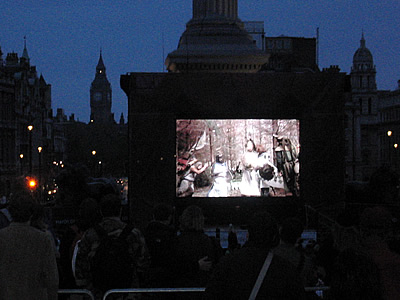
Traflagar Square

This being St George’s day, and unusually we bothered to make an effort. Thanks to Spamalot, in Trafalgar Square, we broke the world record for the most people playing in a coconut orchestra. At 5567, quite a few more than New York’s previous record of 1785. It would have been much higher, but we ran out of coconuts. Pythons Terry Gilliam and Terry Jones made an appearance.

Foot above

Trafalgar Square

Following the record attempt there was the slightly surreal (but strangely appropriate) screening of Monty Python And The Holy Grail at the foot of Nelson’s column. Big Ben on the skyline. The 5,000+ audience still equipped with coconuts joining in wherever a clip and clop might be required.

Back to computing stuff next.

Posted by creacog in Film, Unusual London, 0 comments

are adobe ripping off UK cusotmers?

If you read my earlier post, you’ll know I tend to think they are.

The software is great. I am happy to pay for it. I just don’t see why I should pay so much more for being British. My opinion of the reasons given: “Non Sequitur”.

El-reg are now highlighting this with respect to CS 3.

It’s just not cricket! 🙁

A question for Steve Burnard on the 17th I think.

Update (09/04/2007):

Update (19/04/2007):

Aral Balkan recently wrote an article around this subject. It and its comments are worth a read. I’m hoping that Adobe will listen and act, rather than trot out a stream of excuses.

Posted by creacog in Adobe, Flash Platform, Flex, 1 comment

i finally hot-fixed flex builder

The hotfix was published a few weeks ago. I had been suffering the debug problem on the Mac (193086), so it was time to apply the fix. (NOTE: Unless you are suffering any of the problems listed you are adivsed not to bother applying this fix)

I found the instructions more confusing than they needed to be. They essentially boil down to ‘make a backup copy of your current installation prior to applying the fix’. This is kind of vital, because if you do a straight replacement of the old “Flex SDK 2” folder with the fixed version, and you happen to use charting, you’ll find that the charts.swc is missing!

Also you need to be aware that first time you run the application after the fix, you will need to re-enter your serial numbers.

Posted by creacog in Flex, Mac OS, 0 comments