SimpleOscilloscope : filter update

15 03 2009

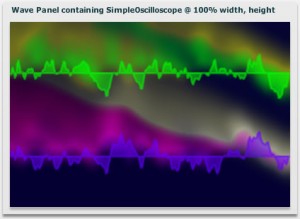
My SimpleOscilloscope component described in an earlier post has now been updated to include a few filters controllable through setting styles. Of course like any other Flex component, it can have additional filtering applied in the normal way. I just felt like including these : alphaDecay, redMultiplier, greenMultiplier, blueMultiplier, blurX, blurY, scrollX, scrollY.

As ever, the project is on google code, and the test bed is here.

SimpleOscilloscope snapshot - with filters


SimpleOscilloscope : my first opensource Flex component

9 03 2009

In the majority of my projects to-date, I am the sole developer on the project team. I was feeling the need to get into writing Flex components to a level that they could be distributed. Essentially making sure I use meta tags correctly and adding appropriate asdoc comments allowing other Flex developers to easily include the component as they would any other from the Flex SDK.

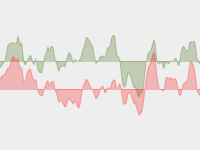
SimpleOscilloscope snapshot

So, ccglib is an MIT license OpenSource project hosted on google code through which i plan to release a number of components. The first component released is SimpleOscilloscope, which plots the currently playing sound-wave. Designed to be easily sized, coloured and positioned through application of styles.


1st debug run following Flex SDK 3.2 update

18 11 2008

Will probably yield scary looking error:

Process terminated without establishing connection to debugger.
Command:
“/Applications/Adobe Flex Builder 3/sdks/3.2.0/bin/adl” -runtime “/Applications/Adobe Flex Builder 3/sdks/3.2.0/runtimes/air/mac” /PathToProject/bin-debug/Project-app.xml /PathToProject/bin-debug
Output from command:
error while loading initial content

So, basically by setting the project to compile against the SDK 3.2 you are implicitly changing the version of AIR you are building against from earlier versions to 1.5. To fix you need to open file :

/PathToProject/Project-app.xml

and change the namespace to “http://ns.adobe.com/air/application/1.5″

This has already been logged as a bug (FB-15687) in the bugbase against Gumbo, by the release of which, hopefully it will be intercepted to present a more meaningful message.


what the feck is AOO TLP ?

19 10 2008

(Update: 28/10/2008 here)

Having been chastised for using these ‘unknown acronyms’ in my comment on jd’s weblog, I thought it worth writing a brief entry describing what these acronyms stand for and how they may be of interest for those purchasing or upgrading Adobe software.

Essentially this is all to do with volume licensing as an alternative to purchasing products through the Adobe store or other 3rd party suppliers. Volume licensing sounds like it is aimed at large organisations purchasing site-license. However the Transaction Licensing Programme facilitates as little as a single product license. The way the scheme works is to provide a transaction discount should you purchase multiple products in a single transaction based upon a point value for each product. TLP purchases may be made through 3rd party suppliers, but also through Adobe directly as in my case. There is no published price list so you need to request a quote.

The key point of interest to me was the Upgrade Plan which allows licenses to be purchased over 24 month subscriptions. Essentially this means I effectively have already paid to cover my CS4 upgrade. This is the point I was trying to make on jd’s weblog. He acknowledges that trial versions of CS3 products not being available until mid November is a ‘Pain point’ and he provides some explanation including the phrase “The big shipping versions get released first.”. Well I’m a AOO TLP upgrade licensee who’s just been told I may have to wait until the ‘end of November’ for it to physically ship to me. If it is painful for ‘users’ who haven’t paid for the software yet, imagine the pain for those who have paid for the software, but may have to wait until the end of November.

So while the Upgrade Plan offers some value, fulfilment seems less than ideal especially given this Key benefit documented on the Adobe site: “Get timely notifications of new upgrades, so you can stay on top of new product releases.”.

This is now my latest bug-bear. For Adobe to see how the customer experience could be improved in this regard, they need only look back to the now discontinued Macromedia DEVNET Pro subscription, where serial numbers and downloadable installers were immediately available to subscribers from day one of a new product shipping.

If this was fixed, I could now be blogging about cool new stuff in CS4 rather than  fuming over this and wondering if I would actually be better-off purchasing through conventional means.

UPDATE : 28/10/2008

Received my Adobe License Fulfilment email on 26th. Logged in and was able to request media for the upgrades, but at the time couldn’t see serial numbers or any way of downloading. However just checked again today, and the serials are there and I now have downloads in progress - and at a good bit-rate. So I’m feeling a lot happier now than when this post was originally published. While the process has not been entirely seamless, this time is far better than my previous experience with CS3 where I had to wait for physical media.


more mvc with lfpug

19 06 2008

Over the past few months I’ve been getting my head around the likes of Cairngorm, PureMVC and better use of design patterns in general. So looking forward to tonight’s LFPUG to see what the Slide Framework For Flex adds to the mix. The other stuff on large datasets looks pretty good too!


Flex and AIR updates

18 06 2008

A little while ago I got around to building my version of an alert tool sampler, using it as an exercise to learn Cairngorm. (The documentation for which I have found particularly poor with the exception of a few gems such as David Tucker’s excellent Cairngorm ‘Getting started’ tutorials.)

Typically AIR developers will all want to take advantage of the Update capability, but in it’s original form requires some work. Rich Tretola’s UpdateManager did the job, but I wanted more programmatic control, interception of events and a slightly different UI work-flow, and set about creating my own.  Just as that phase of the work is completed, I find Adobe’s Update Framework on labs which although beta, does a much better job. I wish it was there a week ago.

Also, I just took the opportunity to update to AIR 1.1. Unfortunately updating Flex to use the new AIR is a little messy (in that it requires manually copying some files rather than running an installer) and means moving to the 3.0.2 stable build of the Flex SDK. However it is not difficult and the instructions to follow are here.


Flex / AIR / DataGrid / itemEditor bug?

16 04 2008

If you are using DataGrid in a Flex/AIR application, the chances are you will at some stage hit the following RunTime error…

TypeError: Error #1010: A term is undefined and has no properties.

.. with a traceback indicating the error occurred within DataGrid.as. At which point you will stare at your own code for a while and wonder why.

In my circumstance I pinned this down to clearing the contents of the data provider and repopulating when there is an item renderer active on the DataGrid. A use-case that probably doesn’t come up that often in web-based Flex apps, since if the user clicks another control to trigger an update, the item renderer is exited at that point and the edit committed prior to the dataprovider changing.

In an AIR app, we have native menus available to us. When the user employs native menu selection, the item editor remains active. If that menu option triggers a repolpulation of the data provider (use-case example File>Open), we then get the error.

The workaround is pretty simple. A call needs to be made to destroyItemEditor() on the DataGrid instance before repopulating it’s data. In a simple application this is no great problem. But if you’ve gone to the effort of using something like the PureMVC framework to separate Data Object from View Components, the data object isn’t supposed to have any knowledge of the view. So in my case thefix is quite crude - when issuing the open command, a notification to destory item editors will be issued so any view component that uses them may destroy their editor prior to the repopulation.

My contention is that it should be the responsibilty of the DataGrid to destroy the item editor if the dataprovider updates.

I have this logged as a bug with Adobe (SDK-15280), along with sample code demonstrating the issue. Feel free to review and vote for the bug if you are in agreement with my point and comment further therein if you disagree or have better suggestions to offer.


DragManager workaround in final Flex3/AIR1

25 02 2008

With today’s availability of release versions of Flex 3 and AIR 1, I’ve finally had a chance to apply the DragManager workaround that I had a moan about last month.

The flex documentation presents three configuration options for DragManager in AIR projects

[Extract]

  1. Your main application file uses the <mx:Application> tag. In this scenario, you use the Flex drag-and-drop manager, and cannot drag and drop items from outside of AIR.
  2. Your main application file uses the <mx:WindowedApplication> tag. In this scenario, you use the AIR drag-and-drop manager, and can drag and drop items from outside of AIR.
  3. Your main application file uses the <mx:Application> tag, but loads the AIR drag-and-drop manager as represented by the mx.managers.NativeDragManagerImpl class. In this scenario, you use the AIR drag-and-drop manager, and can drag and drop items from outside of AIR.

Sounds all well and good. Except to use <mx:Application> within AIR, you lose functionality. For instance in my case while the window was re-sizeable, the content remained at the default size. What I really need is to use <mx:WindowedApplication>, but with the Flex DragDrop manager. A scenario not represented in the documentation.

Fortunately the workaround with files described in bug SDK-13983 so-far appears to work. However it is worth noting that in using it, a number of mxml tags change their namespace from mx to comps. In my case this affects

  • <mx:states>
  • <mx:transitions>

which then become

  • <comps:states>
  • <comps:transitions>

Possibly my reliance on this approach is due to the now legacy nature of the project - it was written in advance of the Apollo 1 alpha. However apart from this issue, very little has had to be re-written through the beta cycle of AIR.


A flurry of events : Adobe/Flash/Flex

21 02 2008

A busy few weeks starting tonight:

  1. [Thurs 21-Feb-2008] LFPUG - Thermo Special presentation from Adobe
  2. [Mon 25-Feb-2008] Adobe sponsored Pokercoder Tournament II  - you need to be a professional user of Adobe products to join in
  3. [Thurs 28-Feb-2008] LFPUG - presentations on ‘Successful Flash Games’ and ‘Practical Particle Effects with Flint’
  4. [Wed 5th March] FLUG - Beer, presentations and chat about Flex