Really handy! … ActionScript 3, Air and Flex documentaion distributed as an application on iPhone and iPodTouch – by Mike Chambers.
Downloaded it, had a play, simple and effective. A ‘back’ button would be nice though in future versions 🙂
Really handy! … ActionScript 3, Air and Flex documentaion distributed as an application on iPhone and iPodTouch – by Mike Chambers.
Downloaded it, had a play, simple and effective. A ‘back’ button would be nice though in future versions 🙂
Fireworks CS4 users have been suffering an odd text shifting problem where text becomes difficult to select and renders outside it’s bounding box while editing. Today an extension was released providing a temporary workaround in by Arun Kaza’s 12/16/2008 10:13:25 AM post on page 3 of this thread.
Wishing those at Adobe writing about DreamWeaver’s wonderful subversion integration would not keep omitting Deletion. Perhaps it is because deletion is not implemented in any automated sense (link) in DreamWeaver’s subversion client and the only sensible way to manage deletions or indeed renames (which as far as subversion is concerned is delete old file and add new file) is to use a 3rd party client. In my opinion this is all the more reason to mention this in articles like that in December’s EDGE “A guide to Subversion integration in Adobe Dreamweaver CS4”. Failing to provide notes on file deletions and file renames is going to leave newbie subversion users in a bit of a mess, with old files hanging around, or being restored when not expected following a revert.
My earlier notes related: Dreamweaver CS4, Subversion and site Synchronize. Two cautions.
An emerging pet hate of mine: AIR applications that do-away with the system chrome, only to then re-implement parts of it, but ignoring host-system conventions. Note this isn’t anything to do with AIR itself, more to do with designers and/or developers not entirely considering user-experience across all platforms.

The example above taken from Tour de Flex.
Personally for this app I see no reason not to have used the host system’s chrome. Doing so would have entirely avoided this issue. But to re-implement fundamental controls such as those pictured using positioning and icons based on only one operating system in an app which is cross-platform undermines the user-experience for users of other systems. In the example, a Windows arrangement and appearance is used which feels wrong on a Macintosh system, where the arrangement should be reversed and in the left rather than the right corner of the window. That it is Adobe setting this presedent in a number of their AIR applications is disapointing. I hope it is a convention other AIR developers will not follow. I certainly wont.
Will probably yield scary looking error:
Process terminated without establishing connection to debugger.
Command:
“/Applications/Adobe Flex Builder 3/sdks/3.2.0/bin/adl” -runtime “/Applications/Adobe Flex Builder 3/sdks/3.2.0/runtimes/air/mac” /PathToProject/bin-debug/Project-app.xml /PathToProject/bin-debug
Output from command:
error while loading initial content
So, basically by setting the project to compile against the SDK 3.2 you are implicitly changing the version of AIR you are building against from earlier versions to 1.5. To fix you need to open file :
/PathToProject/Project-app.xml
and change the namespace to “http://ns.adobe.com/air/application/1.5”
This has already been logged as a bug (FB-15687) in the bugbase against Gumbo, by the release of which, hopefully it will be intercepted to present a more meaningful message.
New Tour De Flex application looking like a very cool and a very useful resource. More information…
Basically it’s a Flex Component explorer as an AIR application and Eclipse plugin.
Just thinking I’d have preferred that the System Chrome was used in the AIR app to provide the min/max/close buttons rather than those alien windows style icons on the wrong side of the window. Mac user me! 😉
This week I’ll be mostly getting my head around effects. Unfortunately missed Tink’s LFPUG presentation, but just been doing a catchup with the video and resources, I think worth re-posting here…
Having just read a tale of woe regarding a dead 2006 iMac, and the indications that this may be a particular issue with those machines, it is looking like AppleCare should be considered by owners far more seriously than normally would be the case. If the logic board dies in the way described, the machine as a whole, which should realistically be good for a couple more years productive life, will become an echonomic right-off.
While initial cost of ownership of Apple machines stacks up with similarly configured PCs, the cost of repair – particularly of the logic board is shocking.
Links:
The following notes assume three file sets: A: the remote site; B: The local site; C: The repository.
We are linked to the repository using the SVN+SSH method I discussed yesterday.
In this particular site, I have a folder within which server-side code generates and deletes server-side text files and modifications to MS Access databases. It is therefore necessary to sync from the server to the local copy. This is done using the settings: Get newer files from remote, and delete local files not on remote server. As in the following dialogue.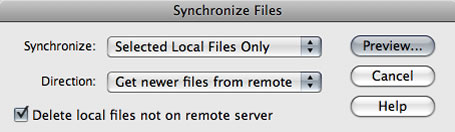
However in my particular site my preview list of files appeared as follows. Can you spot what’s wrong?!
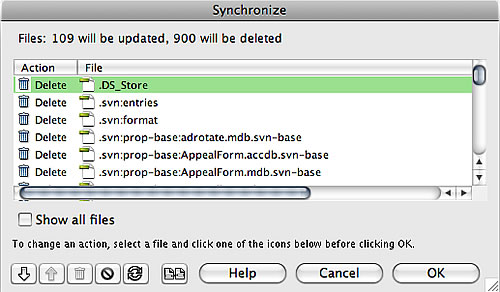
By linking your local site to a subversion repository, you make that local site folder a working copy. This creates a host of hidden files within your local site folder which are used to coordinate synchronisation with the repository. These files should only ever be touched by Subversion. Dreamweaver however has decided in its synchronisation process to check to see if each of these files are on the remote server. Of course they are not – nor ever should be. Dreamweaver has then listed them for deletion!
Important: DO NOT ALLOW ANY OF THESE FILES TO BE DELETED as part of this sync-down. Doing so will break your working copy and break your local site’s sync with the repository.
Of course in the preview list you can go through and set the files you wish not to be afftected to be skipped as I have in the following snapshot…
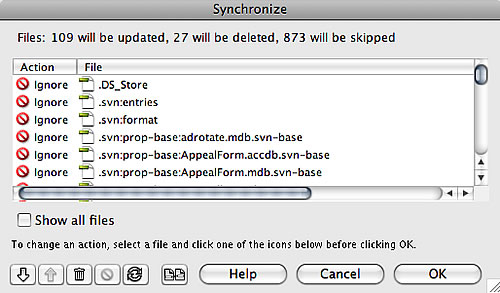
Clearly from the above Dreamweaver has not only given me a huge list to work through, but in doing so has wasted a whole load of time – the FTP commands for checking 900 files are quite time consuming.
I’m not sure why Dreamweaver is including .svn files in this particular synchronisation effort. I can think of no use-case where this would be desired. Dreamweaver is smart enough not to attempt to sync .svn files when updating to the remote server rather than from the remote server.Therefore I suspect this is an over-sight, and I have logged it as a bug via the Adobe Bug Report Form.
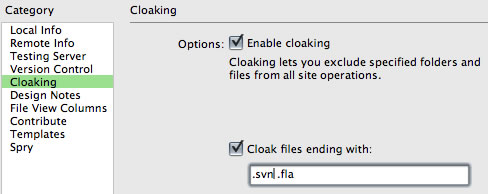
There is a quicker safer way to avoid .svn files being sync’d in this way, and that is to use cloaking. For each site at issue, right-click the site’s root folder and choose Cloaking > Settings…, then enable cloaking and add .svn to the file list…
Deleted site files, either deleted via a sync operation or direct deletion in the Files window, do not get committed to the repository on your next ‘check-in’. In fact so far I have not seen any way for Dreamweaver to inform the repository of deletions and I am currently relying on 3rd party tools to undertake the commit. In my case I use SCPlugin and commit the site folder, at which point it will list the deleted files as ‘missing’. Selecting those and hitting commit records them as deleted to the repository.
Maybe I’m missing something as this seems a major omission of basic functionality. It is quite dangerous for deletions not to get properly recorded to the repository, running the risk that the deleted files may be inadvertently restored to the local copy and eventually to the live site.
Update (4 November 2008):
Having found the documentation, it is clear that Dreamweaver’s subversion integration really does not extend to committing deletions to the repository. They need to be done either manually or through a 3rd party tool as I describe above. Pretty unfriendly for anyone new to subversion and quite different from the workflows used within dreamweavers for sunchronistion between local and remote sites for instance. Personally I think the documentation should explain this fact much far prominently as well as describing in more detail how manage deletion and renaming if connected to subversion.

