creacog

Product Owner/Manager; Digital Project Manager, ex-Developer Available for Product Owner roles

a shout to my corporate site

creative-cognition

After a number of years of content-neglect, and problems of client confidentiality, I’ve finally got around to posting up a case-study covering some simple Flash based work samples. (Note: work samples, not code samples). Flash platform case-studies will be being posted more regularly here on in. But kicking off now with three bespoke user-interface elements : A special accordion, a minimal bouncing menu and a HTMLtext text builder.

The user-interface elements presented may not set the artistic Flash world on fire, but each represent very specific design solutions. They were also interesting and fun to programme.

Bespoke user-interface elements.

Note: creative-cognition ltd is no-longer trading

Posted by creacog in ActionScript, Flash Platform, Work, 0 comments

Flash CS3 : finding the gradient transform tool

I’ve just been driven up the wall trying to find the Gradient Transform tool. 🙁 Most of my work in the IDE is arranging libraries of assets supplied by others, for coding. So for drawing I am a newbie.

I needed to make my own block with a gradient. I knew there was a tool for modifying one once created, but I couldn’t see it in the tool panel, I couldn’t find an option for it in the Modify menu, and the Help page simply referred to it in the Tools panel.

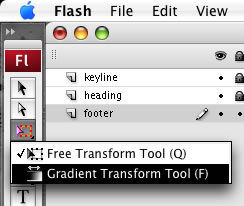
Loation of the Gradient Tool

I eventually found it hidden behind the Free Transform tool : you have to click-hold Free Transform to reveal the Gradient Tool. I still haven’t found it in the menu hierarchy. I have posted comment to livedocs, but thought it worth posting here in the meantime.

Posted by creacog in CS3, Flash Platform, 14 comments

sensible(ish) code print from flex builder (on MacOS X)

Continuing the theme of occasional Flex Builder hints and tips…

Occasionally I need to see code printed on paper. Unfortunately the printing capabilities of Flex Builder, or more specifically in this case, Eclipse, are a bit messy…

  • the font is huge, and only 49 lines fit on an A4 page
  • if you have a background colour set to your code window, it gets printed – decimating your ink-tanks
  • printing is a two dialogue process – you have to go through Page Setup each and every time.

Of course in the actual Print dialogue, you have the standard Mac ability to change the page layout, paper handling etc, and save that detail in a pre-set. However…

The key things I want to achieve is to print 2up full duplex black and white, which gives me four pages of code per sheet of A4, and with a slightly smaller font size I get a more respectable 68 lines of code per ‘page’.

However I’ve found the following approach, once set-up, a little more convenient, and becomes a one-click print…

The Mac has a GNU enscript installed which converts text files to PostScript to send directly to CUPS. In my case I had to update the old Gimp-Print drivers to the current Guten-Print drivers in order to achieve duplex printing.

More information on Guten-Print and access to the drivers on SourceForge. The DMG contains good documentation and a simple package installer.

Once the new drivers are installed, and I’d recommend a new, additional, print queue be set up with appropriate defaults for your code printing, you need to set Eclipse to run an external script to print the currently active code window. From the menu: Run > External Tools > External Tools…

  • Name: enscript
  • Location: /usr/bin/enscript
  • Arguments: -2rT4v -DDuplex:true -diP5000 ${container_loc}/${resource_name}

Obviously you’ll need to tweak the arguments according to your personal print configuration.
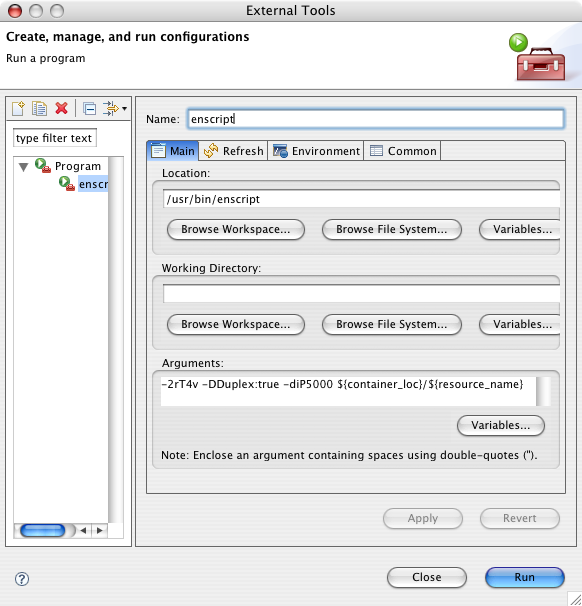
External Tools Dialogue

Posted by creacog in Adobe, Eclipse, Flex, Flex 2, Flex 3, Mac OS, 0 comments

option up and down

Kicking myself for not finding these sooner so, posting in line with the current trend of highlighting little Flex time-savers. Two ActionScript editor short-cuts (and probably apply to any Eclipse code editor?)…

1. Select some code in the ActionScript editor and press Option-Up or Option-Down, and the selected block of code gets moved accordingly. Or just place the cursor on a line if you only wish to move a single line. Saves a load of messing with Cut-Paste.

2. Need to duplicate a line? Place the cursor at the start of the line and press either CMD-Option-Up or CMD-Option-Down, and the current line (or selection if you have one) gets duped above or below the cursor respectively.

With either of the above, if you make a selection, you don’t need to be character accurate. The movement is applied either to the line touched by the cursor, or the lines touched by the selection. i.e. If you select part of a line, the whole of that line is included in the selection to be moved.

Posted by creacog in ActionScript, Eclipse, Flex, Flex 2, Flex 3, 1 comment

flex, mac, external browser

Ted Patrick has been quite prolific of late at publishing little productivity hints and tips. I think this one from a couple of weeks ago is worth echoing and noting the workaround for the problem it raises on a Mac.

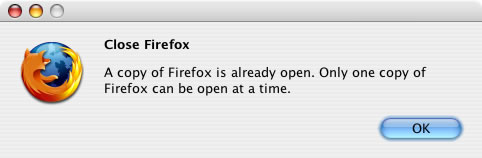
We are setting up Builder to launch the help pages into an external browser. The key advantage of which being that the code samples can then be copy/pasted. On a Mac there is a recognised bug in eclipse that if you choose Firefox as the external browser, and it is NOT your normal system default browser. Basically Eclipse attempts to launch a second instance of Firefox which will generate the “Only one copy of Firefox can be open at a time” dialogue…

Firefox close dialogue

So to get around this, you have two options.

Option 1, if you have Firefox as your default browser for the entire system, simply choose “Default system Web browser” in the Eclipse preferences panel.

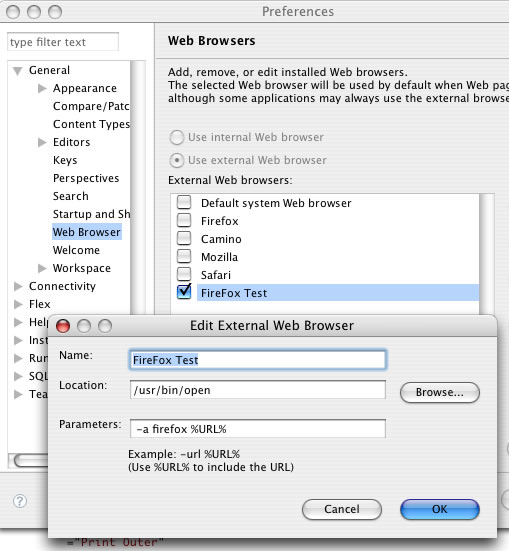
Option 2, if you want to keep something else set as your system default browser e.g. Safari, but would use Firefox for displaying Flex Builder help, you need to either edit or create a new external browser entry using a command structure as per comment 5 on the eclipse bug sheet. Essentially the following settings work…

  • Location: /usr/bin/open
  • Parameters: -a firefox %URL%

Flex Builder > General > Web Browser >Edit external browser

Posted by creacog in Bug, Eclipse, Flex, Flex 2, Flex 3, Mac OS, 1 comment

flash, flex and vice versa

I have a small AS3 project where I need to keep the SWF quite small. I really want to use the Flex Builder environment to do the coding, and ultimately produce a target or targets suitable for inclusion both in Flash and/or Flex projects.

Two very helpful posts of the last couple of days with respect to setting up a suitable environment:

Posted by creacog in Adobe, CS3, Flash Platform, Flex 2, Flex 3, 1 comment

Brazil

I finally got to see Brazil on the big screen last night (22 years after it was released!), at the Prince Charles Cinema in London.

Face

Quite a difficult film so sit through, but contains some iconic scenes and well worth the effort. Shows what can happen when a bug literally drops into the system where you have a labour intensive, but highly mechanical totalitarian bureaucratic state. Which leads my thoughts to the recent facebook conspiracy or reality posting.

Posted by creacog in Film, 0 comments

flash ‘n hardware

Looking forward to this month’s LFPUG meet-up on the 26th July and seeing what can be done with a Wiimote and a Make Controller Kit. Full details on the site.

Posted by creacog in Flash Platform, User Groups, 3 comments

ms access more syntax error issues that aren’t

Continuing from yesterday’s strangeness…

Yesterday, my hosting provider found that the mdb file’s “write and modify permissions were missing”. Very odd! but since that was fixed my ASP scripts could now INSERT.

Today I have almost a repeat of the same symptoms, except this time I can still INSERT but cannot UPDATE. The error given is the same as yesterday i.e. a syntax error in the sql. The sql works fine when executed within the access application. The error number was the same as yesterday…

-2147217900, Syntax error in UPDATE statement

I followed the advice on this forum entry to switch the connection string from an OLE DB connection string to a basic Microsoft Access Driver string. i.e.

“Driver={Microsoft Access Driver (*.mdb)};
DBQ=D:\wwwroot\domain.com\database\database.mdb”

And this fixed it! I have a load of old sites out there still working happily with OLE DB connection strings to access databases. I’m not sure why this one has been so difficult.

Posted by creacog in ASP, MS Access, 1 comment

when is a syntax error not a syntax error

Answer: When you are doing an INSERT INTO on an Access database which is read-only.

I’ve just been doing a bit of classic ASP with MS Access back-end database. I traditionally use the RecordSet object and AddNew to insert records. But thought I’d be good on this occasion and use Jet SQL and the Command Object. Unfortuantely the script broke with error:

Microsoft JET Database Engine error ‘80040e14’
Syntax error in INSERT INTO statement.

80040e14 is a fairly generic error code, with lots of possible causes. Just give it a google!

I checked and double-checked my SQL syntax, which looked fine. Even entering it directly into the Access application showed no problem. I then wrapped the code with the On Error Next, and an error trap which reported the following variation:

Error: -2147217900 Syntax error in INSERT INTO statement.

Same description, but googling the error number revealed just a few results, this amongst them suggesting a permissions problem. Which I didn’t quite believe at first, why would the hosting provider cause the mdb file to be read-only? It is in a folder outside the webroot, if I ask them for a SQLServer account, I’m sure it will allow me to insert records!

Replacing my code with my more traditional RecordSet object, AddNew and Update commands revealed and confirmed the error…

Microsoft JET Database Engine error ‘80040e09’
Cannot update. Database or object is read-only.

If I’d stuck with my old way of doing things I’d have saved a whole load of time spent looking in the wrong places.

Posted by creacog in ASP, MS Access, 0 comments