Apple

hello desire

So, it’s good-bye to my trusty and slightly crumbling Nokia 3100 (recently a source of amusement and pity amongst my peers)…
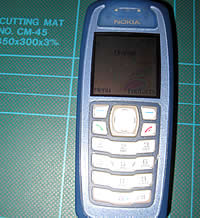
Nokia 3100

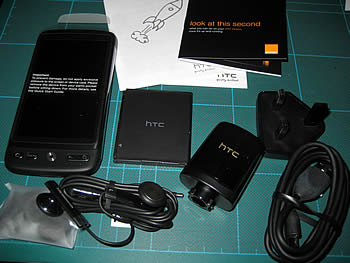
Hello HTC Desire…

HTC Desire Unboxed

It could so easily have been hello iPhone. I do have iPod Touch which I enjoy using. But fundamentally as a Flash/ActionScript/Flex/AIR developer it made no sense at all to get a smartphone on which Flash has been nobbled.

(My own brief comment and observation on the iPhone/Flash debacle : It looks to me that both companies have incompatible business strategies with regard to delivery of RIAs on mobile devices. Discussion outside of the these strategies is in my opinion a deflection. It was disappointing to read Steve Job’s thoughts on Flash, which to my mind are ill-informed and based on half truths – out of character in those regards. It was also disappointing to watch Adobe CEO Shantanu Narayen’s response in interview with the Wall Street Journal where, in my humble opinion, he was far from convincing and by the end was sounding more like a parroting politician. Disappointing too that past quality and performance issues with Flash player gave Apple an easy ammunition to exaggerate and exploit. As an avid Apple Mac and Adobe Creative Suite user I hope the two companies can return to a professional relationship which doesn’t leave customers of both companies, like myself, out in the cold.)

So back to the HTC Desire, some first impressions…

The good

  1. It looks good, feels good
  2. Nice bright responsive screen
  3. Call quality is good
  4. Better quality camera than I expected
  5. The main reason for getting this device – Flash based apps are allowed!

The not so good (compared with my iPod Touch experience)

  1. There are too many buttons. I find myself pressing the wrong one most of the time. Sometimes a button press is required. Sometimes not. The whole thing is less intuitive than the iPod Touch with it’s single button.
  2. It seems all too easy to initiate a call at random while scrolling through the contact list.
  3. Text selection/cursor positioning is awful
  4. There is no out of the box easy way of syncing Address book, Calendar, tunes, photos etc with my Macs. Looks like I need to purchase Missing Sync. That said, I did previously purchase Mobile Me to keep my Mac / Mac Book Pro and iPod Touch all in sync.
  5. The Mail application is crap. I use a self-signed SSL certificate on my mail server, so I immediately hit the problem of a silent fail when trying to add connection details to the mail application. The hack in the forum thread worked in fixing it, i.e. turning off my router’s WAN connection, while inputting the connection details. Also it doesn’t list the mail folders on the server – all I get is the inbox. Apple’s Mail app by comparison is a doddle and reflects the structure of my mail account.

Fingers crossed for Android 2.2.

Anyway, looking forward to setting up some kind of tether to share the data connection with my MBP and more importantly getting something running in AIR for Android on there.

Posted by creacog in Adobe, AIR, Android, Apple, Flash Platform, HTC Desire, 0 comments

Persits AspUpload, Content-type and Safari

A quick note for anyone using legacy server-side classic ASP and the Persits AspUpload component‘s sendBinary to download files to Apple’s Safari browser.

I ran into a problem recently where by Safari was appending “.html” to the file name of all downloads sent via the component. e.g. test.pdf would download as test.pdf.html. There are a couple of mentions on the apple support forums:

PDF files downloaded directly did not suffer this problem – suggesting that the server’s mime types seem ok. Other browsers did not suffer this problem. However the problem has to be server-side. i.e. the download via the script is being sent with Content-type text/html instead of application/pdf no matter what arguments I add to the sendBinary call.

The solution seems to be to manually set the script’s Response.contentType value. i.e. the following test script works…

<%@LANGUAGE="VBSCRIPT" CODEPAGE="65001"%>
<%
    FILEPATH = "D:\WWWRoot\sitepath\www\pdftest\TEST.pdf"
    Dim upl
    Set upl = Server.CreateObject("Persits.Upload.1")

    Response.ContentType = "application/pdf"

    upl.sendbinary FILEPATH, True, "application/pdf", True
%>

In my case this is using AspUpload version 3.0.0.2 on a Hostway Windows 2003 Gold plan, shared hosting.

Posted by creacog in Apple, ASP, Hosting, Microsoft, 0 comments

flash in the pan

So, Flash player 10.1 is available in beta and includes mobile device oriented new features such as multi-touch gestures. Smart! Makes sense with Adobe strategy of delivering to emerging mobile devices. However there are a few million of us already using desktops and laptops with track pads, mouse wheels and mouse trac-balls who are feeling a bit ‘inhibited’. Flash is being used more and more to deliver applications either via browser or the AIR runtime. Such applications immediately feel somewhat inferior when a user cannot scroll or pan a view as they normally would native applications. Arguably ‘Rubbish’ rather than ‘Rich’ RIA in such cases.

For a long time the MOUSE_WHEEL event has been part of the Flash API but only officially supported on the Windows platform (in browser). Original reasoning for not implementing support for the Mac platform can no-longer be argued as all Macs for a number of years have been shipped with the Mighty Mouse (2005) and now Magic Mouse or Trackpads. All of which facilitate mousewheel style interactions. All of which go further and support horizontal as well as vertical scrolling interactions or ‘panning‘. There are JavaScript workarounds for in-browser Flash on a Mac such as this solution on hasseg.org or this SWFObject based pixelbreaker solution. Fortunately Flash applications delivered via the AIR runtime can respond to MOUSE_WHEEL events without any such workarounds. However MOUSE_WHEEL currently only facilitates vertical scrolling in any case.

We need to facilitate horizontal as well as vertical scrolling (panning) of content in response to events from ubiquitous input devices.

A few prominent applications I use often, which suffer:

  • TweetDeck : AIR based. High discoverability of lack of horizontal scrolling support
  • Adobe online store UK : In browser Flex application – Flash being used in an attempt to emulate HTML – no vertical scroll wheel support for Mac users
  • Adobe Flash builder : Design view (Java application with Flash based view)
  • Adobe Catalyst : Art-board view (Java application with Flash based view)

Adobe actively invite comment and suggestions on their products. More widely/easily through the Feature request/bug report form. They have opened up the bug tracking system for a number of products. Flash player being one of them. There is an active bug report with regard to this issue and I would encourage anyone with an opinion to contribute to the discussion and/or add weight by voting. Just sign up and access FP-1262. There is an active drive from within Adobe to help from the community to improve the quality of Flash Player and AIR.

As for the solution I think I’d like to see something along the lines of… Extending the flash.display.InteractiveObject with a ‘panEnabled‘ boolean property defaulted to false which, when true, allows the object’s Panning behaviour/event broadcasting (akin to doubleClickEnabled mechanism). So, when panEnabled is true, if the mouse pointer is over the InteractiveObject, and the user makes a ‘pan’ gesture, the frontmost panEnabled InteractiveObject broadcasts flash.events.MouseEvent.MOUSE_PAN events containing with the additional properties : offsetX and offsetY. Text based InteractiveObjects should default to panEnabled = true. Further, I’d quite like to see mechanisms to facilitate behaviours of nested pan-able objects. E.g. on a Mac, the front-most display object gets scrolled until it can scroll no further, then if the user continues the scroll input, the containing display object then scrolls.

In rounding up, the best place to contribute your opinions on this subject and have them heard by Adobe is here : FP-1262.

Posted by creacog in Adobe, AIR, Flash Platform, Flex, Mac OS, 0 comments

MacPro early 2008 video card dies

A couple of months ago, during a particularly busy period of work, I started to suffer some quite strange symptoms with my MacPro. Essentially, ‘sometimes’ if the system went to sleep, it was not possible to properly wake it up. It was apparent that the machine was starting up, but there was no video signal to either of the two monitors attached. One being an Apple 23 inch LCD. The other being an old CRT. The only way to get back to a working condition being to force-shutdown and restart the system.

My first suspect was one of the monitors – possibly the LCD. But trying them individually and swapping the connectors over made no difference.

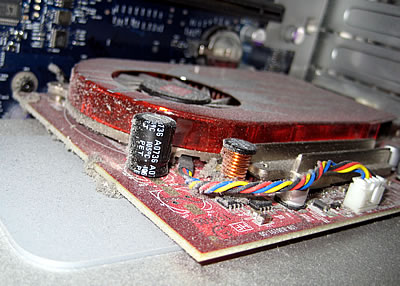
The next suspect being the video card. Taking a look inside, there was a shocking amount of dust build up. I removed the card and gave it a good clean. Unfortunately this didn’t solve the problem. Over the next few weeks the occurrence increased in frequency to the point where one Sunday, after 7 or 8 reboots, it was time for more drastic action.

ATI Radeon HD 2600 XT

I had found a discussion on the Apple support site which echoed the symptoms and seemed to confirm the video card being at fault. My Mac was out of warranty and I needed it working for the next day and so trekked to the Regent Street Apple Store. Really busy store – the worse part was trying to get the attention of a member of staff. But then it was plain sailing. I explained the issue. While he suggested it might make sense to bring in the Mac to be checked – doing so would have been a real pain, run up cost and taken ages. I was pretty confident in my diagnosis. The only option available was an upgrade – which I was pretty happy with. From reading the rest of the support discussion I really didn’t want to replace like with like.

So, £300 lighter I trekked back home with a Apple Mini-DVI to DVI Adapter and a 512Mb ATI Radeon HD 4870. Very releived that the item was in-stock.

It dwarfs the old card, taking up two slots and full width. Installation was not too hard. The worst bit trying to connect the extra power cables to the mother-board.

ATI Radeon HD 4870

Closed the machine and restarted. The new card was picked up immediately. No installation of drivers required. Note: I had been a little worried that drivers may be required as I had previously considered upgrading to  an NVIDIA® GeForce® GTX 285, for which I read that it was vital to install the drivers prior to installing the card. Something difficult to achieve if the old card is dead!

Summing up – very happy so far with the new ATI Radeon HD 4870 which has been running faultless for the last couple of months, and looking forward to more software making user of the GPU, particularly from the likes of Adobe.

Posted by creacog in Apple, 2 comments

Editor bug in Mac OS X 10.6.1

UPDATE 22 June 2010 : Further to my even earlier bug report (FB-9398FlashApe has posted a work around by changing a Snow Leopard system preference.

UPDATE 10-Dec-2009: I’m pretty convinced now that this is an editor bug, not a Mac OS X bug. Essentially the editors are using default OS behaviour which I think is tailored for natural language editing rather than programme-code editing. Original post follows…

I’m currently finding in some applications that “word1.word2.word3” is being treated as a single word as far as the Option-Left Arrow and Option-Right Arrow is concerned on my Mac. This keyboard shortcut should hop word by word. But currently hops from one end to the other. Not an issue for most users, but pretty serious for a programmer working with dot-notation syntax.

I first experienced this working with ActionScript in Adobe’s Flash Builder Beta 2 and logged a bug report, but further investigation reveals that some unrelated applications show the same behaviour. I have now logged a bug with Apple, but in the meantime I would be interested to know if others are experiencing the same? Or if you are running 10.6.1 and not seeing this issue? Please add a comment – I’m still trying to work out if it is something installed on my system. I don’t think it is basic user preferences as I am seeing the same in another user-account on this system.

Editors incorrectly treating “word1.word2.word3” as a single word re opt-left and opt-right:

FlexBuilder 3 MXML and AS editors
FlashBuilder 4 Beta2 MXML and AS editors
Apple Mail
Apple OS textfields including:
Spotlight
Finder window findfield
Safari: form-textfields + google search field
editors with *correct* opt-left opt-right behaviour
TextWrangler
Adobe Flash CS4 IDE ActionScript Editor
Adobe DreamWeaver CS4 editor
Apple XCode editor
Apple Finder – filename clicked and editable when renaming
Firefox form-textfields and goodle search field
  • FlexBuilder 3 MXML and AS editors
  • FlashBuilder 4 Beta2 MXML and AS editors
  • Apple Mail
  • Apple OS TextFields including:
  • Spotlight
  • Finder window find-file
  • Safari: form-textfields & google search field

Editors showing correct opt-left opt-right behaviour:

  • TextWrangler
  • Adobe Flash CS4 IDE ActionScript Editor
  • Adobe DreamWeaver CS4 editor
  • Apple XCode editor
  • Apple Finder – filename clicked and editable when renaming
  • Firefox form-textfields and goodle search field
Posted by creacog in ActionScript, Apple, Flex, Mac OS, 0 comments

No CMD-SPACE in Flash Builder since Snow Leopard

Ok so CMD-SPACE is the default short cut to launch Spotlight. But I wanted that combo for ‘content assist’ with Flex/Flash Builder. Until installing Snow Leopard, that is what I had for a few years, and Spotlight relegated to CTRL-SPACE. However since SnowLeopard, the CMD-SPACE combo is not transmitted to Flash Builder. I assume this is down to Snow Leopard somehow reserving the combination. So begrudgingly I have returned to defaults…

Spotlight : CMD-SPACE
Flash Builder content assist : CTRL-SPACE

Posted by creacog in Flash Builder, Flex Builder, Mac OS, 3 comments

flash.display.BitmapData gotcha – well gotme for a while

The documentation is correct, so i have no excuse, but I didn’t initially read much beyond the signature of the constructor…

public function BitmapData(width:int, height:int, transparent:Boolean = true, fillColor:uint = 0xFFFFFFFF)

I needed a transparent bitmap. Reading the default “transparent:Boolean = true”, I assumed by simply supplying width and height, a transparent bitmap is what I would get. Not so! I got a white rectangle. The reason being, that the default fill colour is 100% white. (The first pair of FFs representing the alpha in ARGB).

At first it would seem slightly unintuitive for the second default to conflict with the first, until one realises that the ‘transparent’ flag is there to indicate whether the object will support transparency or not. Not to state that it should be initially created transparent. Supporting transparency increases data size from 24 bits per pixel to 32 bits per pixel.

So what i should have done :

bmd = new BitmapData( width, height, true, 0 );

Posted by creacog in ActionScript, AIR, Flash Platform, Flex, Flex 3, Mac OS, 0 comments

updated svn+ssh with DreamWeaver article

After various Mac system and security updates found that ssh+svn would result in errors…

svnserve: Command not found.
svn: Connection closed unexpectedly

Updated my previous article on using svn+ssh with DreamWeaver with a solution.

Posted by creacog in Adobe, DreamWeaver, Mac OS, Subversion, 0 comments

apple security update 2009-001 breaking PowerPC apps ?

Since installing this update I observe on my intel based mac that two PowerPC based apps now crash immediately on launch. Logging “Exited abnormally: Illegal instruction” to the console. The two applications affected so far on my system are CanoScan Toolkit X and more importantly Retrospect. Unfortunately the installers for both applications also fail with the same error. I worked around the canon issue by installing the LiDE 35 driver (for my LiDE 50) – then using “Import image…” in Preview. However not found a workaround for Retrospect yet. Looks to me like Rosetta is not working properly, although I have one PowerPC process running “RetroRun”.

Annoying and scary for my backups to be crippled in this way. Investigating. Not sure it was the security update as yet, only ‘evidence’ being the timing of the failures.

Update: Solved…

The following typed into terminal, followed by a re-start fixed the problem…

sudo update_prebinding -root / -force

As per instructions by Charles Minow in this thread on the Apple support discussions.

Posted by creacog in Apple, Mac OS, 0 comments